
Where your future begins

Office Depot Instructions

Categorized In: Operations - QE2 Purchasing

Approved Date: August 21, 2026

Owner: Melysa Johnson

Check the Purchasing Business Rules policy before ordering from Office Depot

1. Offices should limit their Office Depot orders to once per quarter, when possible.

  • a. Place orders during the first week of the first month of each quarter (January, April, July, October)
  • b. If needed, offices can place an order for items that cannot wait until the next quarter, such as Ergonomic Assessments, items required for a conference or meeting, etc.

2. DPA’s do not need to be created for Office Depot orders, however;

3. You will need to enter a PO# for each order. Offices can use FYXX (where XX=current state fiscal year) and sequential numbers as the PO Number (e.g. FY25-1, FY25-2, FY25-3, etc. to track their orders each state fiscal year (July 1 – June 30), or another tracking convention specific to the office.

4. All Office Depot Account holders will be responsible for marking up and emailing their invoices to vr.soacctgfaxreceivers@nebraska.gov within 3-5 days of receipt.

  1. Go to the Office Depot web site (bsd.officedepot.com) 
  2. Search for item by name or item number;
  3. Enter quantity and click “Add to Cart” 
  4. Click “Continue Shopping” until all items have been added to the Shopping Cart;
  5. Once all items have been added, go to the Shopping Cart;
  6. Enter the following in the Comments box for each item in the Shopping Cart:
      1.  
    1. grant/activity (e.g. 110, TBI, CPAP, etc.)
    2. if the item is for an ergonomic assessment enter ERGO 
    3. person or office the item is for

Comments box Examples:      CPAP – John Doe 

110 – Kearney office

110 – ERGO –  Jane Doe

TBI – Jack Doe

  1. Once the Comments box has been completed for every item, go to Checkout and click “Save Order” at the bottom of the page to receive an email with the items in your cart. NOTE: If written approval was already obtained before entering items in the cart, skip to Step 9.
  2. Send the email with the items to Office Director/Supervisor for approval. Approval e-mail must be retained by the field office.
  3. Once approval is received, go to cart and click Checkout. 
  4. At the checkout screen:
    • under User Information, verify your email address is correct.
    • under Email Options, check the box “Send me an email confirmation for this order”
    • under Account Information:
      • enter your PO Number
      • fill in the contact and contact phone (if not pre-populated)
      • Click Place This Order
  5. An e-mail will be sent to you confirming your order.

1. Invoice(s) for items ordered will be emailed to the person who placed the order after they shipped. (You could receive multiple invoices for your one order). 
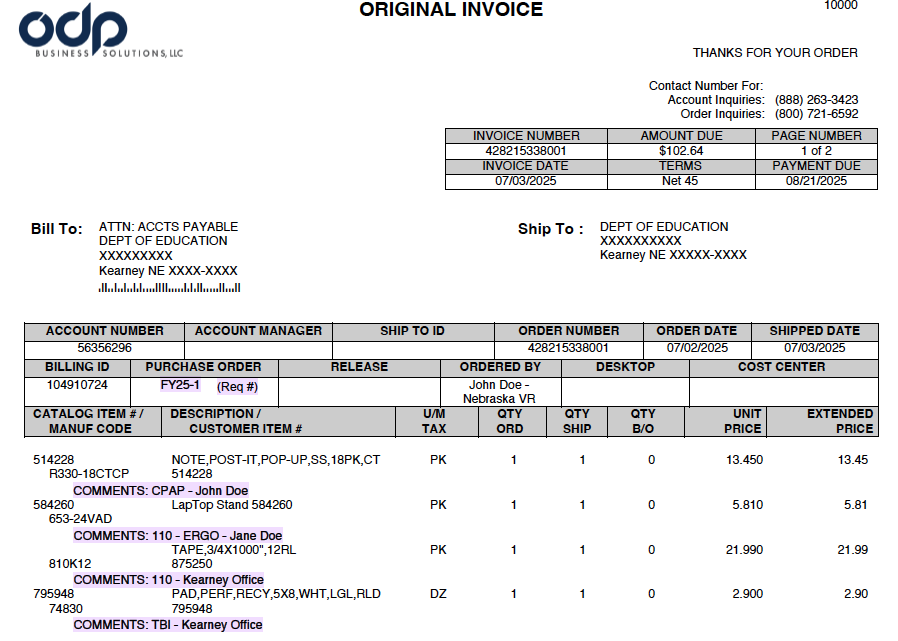
  • The Comments entered for each item will be printed on the invoice (see below):


2. Total all items with the same GRANT/ACTIVITY and list your total(s) on the first invoice page. For example (using invoice comments above):

        $13.45 - CPAP
        $27.80 - 110
        $ 2.90 - TBI
 
3. Once you have verfied all invoices are received for your order, create one pdf of all invoices to prepare for signatures.
 
4. Obtain Office Director/Supervisor signature on each invoice to verify prior approval to order was obtained and approval to pay.

5. Email marked up/signed invoice(s) to vr.soacctgfaxreceivers@nebraska.gov with subject line "Office Depot-Team" (e.g. Office Depot - Lincoln) within 3-5 days of receipt of your invoice(s).


Approved Date
July 23, 2025 Show this Archived Version
July 21, 2025 Show this Archived Version
October 02, 2018 Show this Archived Version


back to top